69 templates, all free
Free project management templates
Ready-made workspaces for projects, meetings, marketing, sales, HR and more. Pick one and Redbooth sets up the task lists and tasks, so your team starts from a plan instead of a blank page.
Templates are on every plan, including Free for up to 2 users. No credit card.
How the templates work
- 1. Pick a template. Each one shows its task lists and tasks before you use it.
- 2. Create the workspace. Redbooth copies the lists and tasks into a new workspace in your account.
- 3. Make it yours. Assign tasks, set due dates, and see the work on a kanban board or a Gantt chart.
Repeat a project often? Any workspace you build can become a template too. Workspace templates →
Project management templates
Plan a project, report its status, run sprints and learn from what went wrong.
-

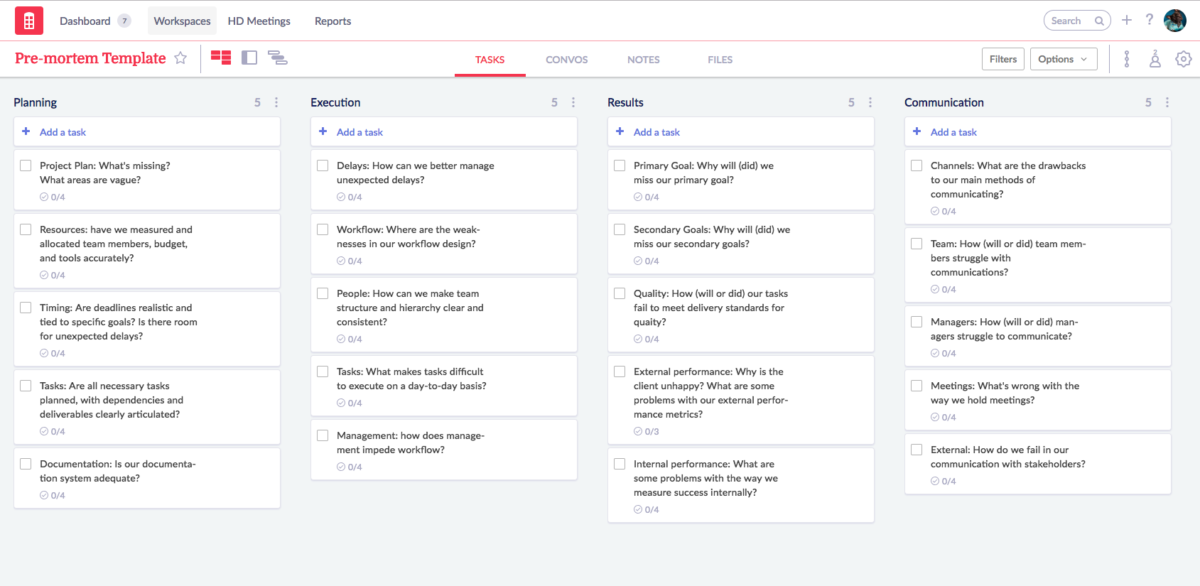
Project Post-mortem Analysis
4 task lists · 20 tasks
What can your team learn from failures, real or imagined? The pre-mortem and postmortem template allows you to record project mishaps in conjunction with action items so you can learn from mistakes and avoid repeating them in the future.
Planning · Execution · Results · Communication
See the template → -

Project Status
4 task lists · 14 tasks
Projects have many fluid and fast-moving elements. Use the Project Status workflow template to help quickly and efficiently capture key data points regarding requirements, progress, accomplishments, budget, milestones and more. Invite key constituents to the workspace and assign these updates to them to help reduce time spent in status meetings and sending endless emails to request status updates.
Accomplishments · Next Actions · Actions on Hold · Resources & Costs
See the template → -

Scrum Sprint Planning
5 task lists · 14 tasks
Scrum is an Agile framework for completing complex projects. Scrum originally was formalized for software development projects, but it works well for any complex, innovative scope of work.
Vision / User Story · Product Backlog · SPRINT Backlog · In Process · SPRINT Review (Increment)
See the template → -

Strategic Planning
6 task lists · 30 tasks
This template gives you a clear and manageable roadmap for strategic planning for a new business or initiative. And you don't have to do it all yourself, either — after you launch this template in your workspace, you can assign tasks to members of your team, contractors, or virtual assistants.
Problem · Product · Landscape · Marketing · Financials · Execution
See the template → -

Change Management Plan
6 task lists · 33 tasks
Managing Change just got easier. The Redbooth Change Management Plan Workspace Template provides you with all the necessary knowledge to manage change step by step.
Identify the Change · Particulars of the change · Change Approach · Implementation strategies · Implementations Package Development · Review Change Strategy
See the template → -

Product Launch
4 task lists · 19 tasks
After months of hard work, your team is now ready to ship the next great feature or product. Before you can do that however, you need to have a plan to make the launch a success. Use this template to plan and coordinate your go to market strategy. Whether you're planning a press release, a social media campaign or something else entirely, this template will make life easier for your product, marketing, and engineering teams.
Planned Features · Go to Market Plan · Upcoming Features · Post Launch Todos
See the template →
Meeting templates
Agendas, checklists and action items for weekly meetings, one-on-ones, quarterly reviews and board meetings.
-

Weekly Meeting
4 task lists · 21 tasks
Make your team meetings more efficient! With this template, you can prepare for, plan, and execute team meetings quickly and easily. You’ll get a dedicated space for capturing action items, as well as a customizable list of reminders and steps.
Action Items · Pre-Meeting Checklist · Meeting Checklist · Post meet
See the template → -

Team Meeting
5 task lists · 5 tasks
Your meetings should accelerate the work that your team does, not slow it down. With a shared team meeting workspace, you can collect key information in one place in advance, enabling you to focus on essential questions during your meeting: What's preventing our progress? What are some blockers? Are there decisions that need to be made? Are there things that we need to discuss for alignment or for informational purposes? This streamlined, flexible team meeting template makes it easy for you to turn your meetings into opportunities to address those key questions. Action steps can be identified, recorded, and revisited in the next meeting. Use this template to drive improved continuity, productivity, and accountability — and keep your team moving forward.
Weekly Agenda (Define BEFORE meeting) · Action Items From Previous Week · Action Items This Week · Constant Improvement · Backlog of Ideas
See the template → -

Effective Meetings
5 task lists · 19 tasks
Make your team meetings more efficient and productive. This template will help you prepare for, plan and execute team meetings quickly and easily.
Planning · Pre-Meeting Prep · Before Starting the Meeting · Meeting Agenda · After The Meeting
See the template → -

One-on-One Meeting
5 task lists · 9 tasks
A one-on-one meeting shouldn’t have to be a status update! This lightweight one-on-one meeting framework serves as a container where you can store and visualize all the engagement and records related to your meetings with your direct reports. It’s also a place for you track what’s going well, record feedback from each employee, and track short- and long-term goals. As a manager, you can launch this template as many times as you like to create a unique workspace for each employee you meet with on a regular basis. Refer back to that employee’s workspace before and during each meeting, or whenever you want to capture a note or an update for future reference.
Tips for Success (before you begin) · Weekly Agenda (Employee to define BEFORE meeting) · Action Items For Next Week · Manager Feedback for Employee · Employee Development
See the template → -

QBR (Quarterly Business Review)
7 task lists · 12 tasks
From quarter to quarter, employees — and even management — can have a tough time even remembering what the last meeting was about. When you meet at the end of a quarter to look back and to look ahead, it’s incredibly valuable to capture those insights as well as your notes, slide decks, and quarterly reports. This quarterly business review makes that process nearly effortless. Once you start using it on a regular basis, you’ll be able to have visibility into what you talked about not only last quarter, but two quarters ago or a year ago. When you gather your entire team together, you’re going to want to be able to consolidate and centralize this ambitious, wide-reaching meeting. Now you have the scaffolding to do that in just a few clicks.
Preperation for Your QBR · Completed, Outstanding & New Items · Metrics Review · Overall Health · Customer Success · Product Roadmap · 90-Day Team Plan
See the template → -

Executive Strategy Meeting
8 task lists · 54 tasks
Planning an offside Executive Meeting just got easier with this Workspace template that we at Redbooth use to hold highly effective Executive Strategy Meetings. Getting all departments of your company on one page for planning a meeting has never been easier.
Meeting · Metrics & Insights · Kick-off · Meeting — Course · Day 1 — Situational Analysis · Brainstorming · Day 3 — Re-iterate Strategy · Day 3 — Review
See the template → -

Prepare for Board Meeting
3 task lists · 24 tasks
The BOD meeting is the CEO's chance to explain how the company is doing in front of it's Board of Directors. Use this workspace to prepare that presentation, so that your stakeholders will get the best possible overview of how your company is doing, without stealing their time.
Preparations · Agenda · After Meeting
See the template →
Marketing templates
Strategy, research, content calendars, social media, webinars, press releases and Marketo programs.
-

Digital Marketing Strategy Planning
6 task lists · 25 tasks
Don't let all of the digital marketing strategy possibilities overwhelm you! This template gives you a clear and manageable roadmap for managing your digital marketing strategy for a new business or initiative. And you don't have to do it all yourself, either — after you launch this template in your workspace, you can assign tasks to members of your team, contractors, or virtual assistants.
Situational Analysis · Objective Setting · Strategy · Tactics: Reach · Tactics: Convert · Tactics: Engage
See the template → -

Market Research
6 task lists · 27 tasks
Who is your competition? Who is your ideal buyer? What do you need to do to find out — and what will you do with that information once you find it? This workflow makes the entire process more accessible and more productive.
Who is the competition? · Identify your ideal buyer · Determine what works for your sales funnel · Determine the best performing ads · Where to acquire physical products for your funnel · Building the final funnel
See the template → -

Social Media Marketing
7 task lists · 73 tasks
LinkedIn, Facebook, Twitter...oh my! Getting fully set up for social media marketing can seem overwhelming. Now it's easy to keep track of it all in one place. Filled with helpful tips and reminders, this Social Media Marketing Template will help you break down the process of setting up your organization's social media channels into manageable steps.
Setup Instagram for Business · Setup LinkedIn for Business · Setup Facebook for Business · Setup Twitter for Business · Setup Google+ for Business · Setup YouTube for Business · Setup Pinterest for Business
See the template → -
Social Media Calendar
4 task lists · 9 tasks
Facebook, Twitter, LinkedIn, YouTube, Instagram, Snapchat...With so many social publishing platforms where your audience is active on, how do you stay present and relevant in the minds of your customers? With this social media calendar, peace of mind is just around the corner. With this template, set up a workspace for developing, planning, and scheduling the content you're publishing to generate the maximum engagement with your audience.
Ideas · Draft · Scheduled · Published
See the template → -
Blog Editorial Calendar
4 task lists · 10 tasks
Managing a regular publishing schedule for your blog is critical for building an engaged audience. Use this editorial calendar for planning, coordinating, and publishing new content that your readers will love.
Proposals · Active · Published · Review
See the template → -
Webinar Planning
4 task lists · 52 tasks
If you're a solopreneur, agency, or consultant with expertise so essential that your customers will gladly pay for a video seminar, this process is for you. With this template, you'll develop a webinar with paying customers, advertise and market it, and follow up with participants afterward. You'll even know when it's time to create an early-bird pricing video — and when it's time to raise the prices.
ADMIN · Prep · Live · Post Webinar
See the template → -

Press Release Management
5 task lists · 26 tasks
When you've got an event, new product, or even an award to announce, it's time to send out a press release...but there's more to the process than just writing it. Manage the entire process here. Be sure to explore the workspace files section for sample formats!
Press Release Layout · Press Release Content · Distribution - Media Outlets · Press Release Follow Up · Media/ Press Kit
See the template → -

Customer Testimonials
3 task lists · 6 tasks
Customers love your product. Now, leverage that positive feedback to attract new business. Use this template to gather your best customer quotes and case studies all in one place. You can organize the board across different product lines or audience segments. Record direct quotes or embed a video testimonial in task cards to keep track of the latest quotes.
Submitted testimonial · Marketing Approved · Interested in
See the template → -
Customer Value Optimization
6 task lists · 27 tasks
This detailed, comprehensive workflow walks you through the process of turning a lead into a returning (and paying) customer. It takes you from setting up a lead magnet to closing the loop...and everything in between!
Get Started · Set up your lead magnet · Set up a special offer · Your core product · Profit maximization · Closing the loop
See the template → -

The 4 P's of Marketing
4 task lists · 29 tasks
The 4 P's of marketing help define the critical elements of the marketing mix. Each has an influence on the other. Together, they make up the business plan for a company and its go-to-market strategy. When executed properly, the 4 P's can strongly influence success, but when handled poorly, the business results will not be a success and a company could take years to recover. The marketing mix needs a lot of understanding, market research and consultation with others (inside and outside the company) to have the greatest impact.
Price · Promotion · Place · Product
See the template → -

The Ultimate Growth Hacking Sourcebook Part 1
4 task lists · 44 tasks
New Zealand online-marketing firm Rocketshp (formerly Tiger Tiger) created an irreverent, humorous, and "no-nonsense" guide to online marketing. They've identified the insider tools, tips, and tricks that will help you get a competitive edge. Now your team or agency can take that set of best practices, launch it in your own Redbooth workspace, and automatically turn each tactic into an action item that can you delegate!
Introduction · Acquisition · Activation · Revenue
See the template → -

The Ultimate Growth Hacking Sourcebook Part 2
2 task lists · 30 tasks
This is the second part of The Ultimate Growth Hacking Sourcebook by Rocketshp (formerly Tiger Tiger). Learn amazing hacks to implement a referral program, and augment customer retention.
Referral · Retention
See the template → -
Marketo - Build Lead Lifecycle
3 task lists · 10 tasks
Dedicated marketing ops people, this Marketo template is for you! Think of the funnel metrics you have: if you were to build out a lead lifecycle, what are your to-do lists? You'd want to define your lead cycle stages: How does somebody get there? How does somebody transition in and out of them? You'd want to use Marketo's modeler tool to build your model, and you'd want to set up your dashboards and reporting so you can track it all. This template gives you a simple way to identify all of the steps. Once you've launched it in Redbooth, you can get your team involved, too — it's easy to assign tasks and add deadlines.
Data Quality · Modeler · SLA
See the template → -
Marketo - Implementation
3 task lists · 15 tasks
With this innovative template, you can put yourself in Marketo's shoes: If you were Marketo, what steps would you take when you deploy Marketo into a new environment? This template functions as your to-do list: sending documentation to the IT team, holding a kickoff call, and providing the education and resources needed to ramp up the team — and that's just the beginning.
Marketo · Client · Client's IT Department
See the template → -

Marketo - Nurture Program
3 task lists · 20 tasks
This template is designed to make it easy for you to launch a clean, three-piece nurture program in Marketo to help you turn leads into customers. If you'd like to build out a more robust program, it's simple to add additional tasks or lists to the template once you launch it in a Redbooth workspace. This template walks you through the process so that you'll never have to say, "Wait, I didn't know I needed that!" Use it to maximize the value you get from Marketo at your organization.
Asset Creation · Content · Smart Program
See the template → -

Marketo - Webinar
3 task lists · 24 tasks
When you're planning and promoting a webinar, there's a lot to keep track of — especially when you want to be strategic about your promotion and follow-up! Marketo can integrate with a variety of webinar platforms, including WebEx, GotToWebinar, ON24, ReadyTalk, and Adobe Connect. No matter which webinar platform you use, you can use this workflow template as your checklist — from your Marketo Smart Campaign to planning your invitations and reminders to all of the little housekeeping pieces you need to keep track of.
Smart Campaign · Emails · Landing Page & Form
See the template →
Event planning templates
From the first brainstorm to the follow-up after the event.
-
Event Planning
13 task lists · 115 tasks
Planning a big event? Use this template to organize all your pre-planning, research, day-of and post-event tasks. Great events start with a great plan.
Brainstorming · Budgeting · Invitations · Venue · Marketing · Sponsorships · Food · Transportation · Venue Setup · Safety · 2 Weeks Prior: Final Checklist · Day of Event Checklist · After Event Checklist
See the template → -

Plan an Event
6 task lists · 34 tasks
The days of using sticky notes (or endless email chains) to collaborate on event planning are over! This ready-made workspace guides you through the entire process, stage by stage. Each task list is packed with helpful details. Make sure that nothing falls through the cracks on the big day.
Research and Preparation · Event Checklist · Event Logistics · Execution: Event Day · Marketing and sponsors · After Event Checklist
See the template → -

Event Marketing
5 task lists · 20 tasks
Planning an event for your customers? Turn it into a success with this workspace for coordinating and marketing events. You can schedule upcoming meetups, track attendees, and plan marketing campaigns.
Upcoming Events · Promotion · Attendees · Vendors · Venues
See the template →
Sales and client work templates
Track deals, close the month, and take a client from intake to the end of the project.
-
CRM Light
7 task lists · 3 tasks
Are you still using an Excel spreadsheet....or an overly complex and heavy CRM system to manage your sales funnel and pipeline? Use the "CRM Light" workflow template to create a simple and elegant way to manage the flow of sales opportunities. Are you in business development? You can also use this to track your partner opportunities as well. Suggested use: create a single instance of this workspace for your sales team or business development team. If your team is too large for a single workspace, you can create multiple workspaces such as "SMB Sales" and "Large Company Sales" or "US Sales" and "International," etc. If you have any suggestions or additions to this workflow, or want to share feedback, contact: workflow@redbooth.com
Opportunities · Appointments · Qualifying/Needs Assessment · 25% Probability of Closure · 50% Probability of Closure · 90% Probability of Closure · Closed/Won!
See the template → -

Sales Mutual Action Plan
7 task lists · 20 tasks
Empower your sales team! This customer-focused workflow enables your team to drive and strengthen the sales process, making it easier to move forward with new opportunities. Now it’s easy for your reps to show each prospect what it will be like to work with your organization, step by step. It takes just a few moments to launch and personalize it in a new workspace each time. Each time you prepare the buy cycle for a new prospect, you can simply download it again. To get the most out of this workspace, you can also view this demo on how you can use Redbooth to lead growth and accelerate sales.
Inbox · Phase 1: Education and discovery · Phase 2: Validation and needs definition · Phase 3: Final discussions and agreement · Phase 4: Implemention · Phase 5: Quarterly checkup · Action Items
See the template → -

The Sales Office
7 task lists · 36 tasks
Redbooth makes it easier for you to manage and lead your sales organization. Sales leader Jeff Koll designed this workspace to help you support your reps, capture valuable feedback, collaborate with your Product and Support teams, track top deals, and more. And, as Jeff points out, “The Sales Office workspace is also a great place to share information, celebrate victories and motivate each other to close the next big deal.”
Inbox · Weekly Strategy Sessions · Team Top Deals · Themed Programs · Competition · Customer Product Requests · Sales Operations Help and Requests
See the template → -
Sales Ops - Monthly Close Process
3 task lists · 29 tasks
This template includes checklists to be followed in a month's close, including sales commissions for a team of inside sales. It is inspired in Redbooth's own month close process and it applicable to products with a recurring payment model.
Month Close - General Process · Monthly close Process: Data Reconciliation · Month Close - Sales Commissions
See the template → -

Client Intake
5 task lists · 31 tasks
Do you run an agency or consulting firm? Creating an amazing client experience begins with a client intake process that’s polished and professional. Use this template to create a smooth onboarding process that wows your client, keeps your team aligned, and lets nothing slip through the cracks.
Initial Steps · Internal Systems · Internal Project Management · Client Onboarding + Training · Welcome Package Contents
See the template → -

New Client Workspace
5 task lists · 19 tasks
Just landed a new client? Great! Start the engagement the right way with this highly effective workspace for organizing all activity related to the account. The template contains a simple, yet powerful set of lists to kickoff and manage the new relationship. Go get 'em!
Identify The Competition · Identify Target Customers · Evaluate Sales Channels · Determine the best performing ads · Building the final funnel
See the template → -

Ongoing Client Care
5 task lists · 21 tasks
Once the project is underway, your job is to stay on deadline, in scope, and on budget (honorable mention: continually delighting your client). This template captures the daily, weekly and periodic tasks that will allow you to see issues before they become problems, to stay on top of documentation, and to keep your project running smoothly.
Project Management - Daily · Project Management - Weekly · Team Meetings and Client Meetings · Handling Exceptions · Client Care
See the template → -

Client End-of-Project
5 task lists · 18 tasks
This template shows you how to efficiently close out client projects when your work together is done. Use these steps to delight your client right up to the end, keep your internal systems tidy, and ensure continual process improvement.
Contract/Billing · Final Product Delivery · Client Relationship · Internal Systems · Project Management
See the template →
Design, product and IT templates
Web and brand design projects, bug tracking, product feedback and IT maintenance.
-

Web Design
9 task lists · 54 tasks
Managing multiple client projects with ease, whether your team is on-site or distributed across the globe. This workflow is based on the actual processes and best practices used by Blue Fish Design Studio to successfully manage large numbers of complex client projects.
Project Management · Design · Front-End (HTML/CSS/JS) · CMS (ExpressionEngine) · Content Strategy · SEO · Project Launch · Post-Launch · Punch List (finalizing and Bug reports)
See the template → -
Visual Design Process
5 task lists · 25 tasks
Designing a new brand, logo, or website? Many clients are new to the visual design process and are looking for guidance. As designers, you know the best results come through close coordination and managing of expectations. Use this template to create a smooth visual design process that wows your client, keeps everyone aligned, and keeps the whole project on track.
Research · Concept Generation · Logo Design · Website Design · Develop Brandmark Family
See the template → -

Bug Tracker
4 task lists · 12 tasks
Struggling to stay on top of new bug reports? Use this template to triage and escalate reported issues so that your software development team can prioritize their work. Once a bug report is created as a task, determine the level of priority and assign them to the appropriate team member(s) accordingly. Finally, use tags to group bugs by product category and priority to unlock filtering options in your workspace.
Inbox · Upcoming · Active · Fixed
See the template → -

Customer Feedback
3 task lists · 11 tasks
Document and prioritize your customer's feedback using this simple workspace. Ideal for product managers, marketers, sales, and customer support teams who regularly interact with customers. This is useful for teams when assessing their product roadmap and analyzing their user feedback.
Customer Support · NPS Survey · Feedback Forum
See the template → -

IT Maintenance Plan
10 task lists · 58 tasks
Using Redbooth, IT departments have cut the time needed to complete weekly maintenance in half. Get a head start on streamlining departmental processes and take a systematic approach to performing routine IT tasks for your organization. Help ensure that your system remains free from data corruption, security breaches, and poor network performance.
Physical Hardware Checks · Backup & Restore · Software Updates & Licensing · Event Logs & Services · Disk Management · Security & Anti-Virus · Active Directory · Microsoft Exchange Mail System · Network Performance · Miscellaneous
See the template →
HR and recruiting templates
Hiring, onboarding, offboarding and time off.
-

New Employee Onboarding
7 task lists · 50 tasks
Onboarding a new team member just got easier! Now you can support each new hire with a comprehensive onboarding workspace. Help them start things off on the right foot — and track paperwork and key steps throughout the process. This template is ideal for: Human Resources Managers Hiring Managers Team Leads Scrum Masters
PRE-ARRIVAL · FIRST DAY · FIRST WEEK · FIRST MONTH · FIRST QUARTER · FIRST SIX MONTHS · FIRST YEAR
See the template → -

New Hire Checklist
6 task lists · 54 tasks
Bringing on a new employee? This template is the perfect place to start! It includes detailed checklists for Human Resources to follow when getting a new hire started, as well as to-do lists for managers to follow as they get the new hire oriented.
3 Weeks to Start: HR To-do's · 1 Week to Start: HR To-do's · First Day: HR To-do's · First Day: Manager To-do's · 1st Week: Manager To-do's · 1st Month: Manager To-do's
See the template → -

Employee Offboarding
4 task lists · 25 tasks
Preparing the Exit · Staff Members Leaving the Organization · HR · IT Team
See the template → -
Hiring Funnel
11 task lists · 9 tasks
Hiring is one of the most important aspects of building and growing your company. Integrate every member of your company in the hiring process. Everybody knows somebody, and this somebody could be your next employee.
References · I wish I had... · Incoming (Resume / Cover Letter) · First Interview · Applicant Homework · Internal Discussion · Second Interview (optional) · Final Interview · Offer made · Trial Period · Contractors
See the template → -
Time Off (PTO) Requests
3 task lists · 12 tasks
Track and approve PTO requests from a single source of truth. Use this template to invite your team to plan and request upcoming time off so everyone's schedule is in sync.
New PTO Requests · Approved PTO · Company Holidays
See the template → -
Employee Directory
4 task lists · 14 tasks
Your team is growing faster every month. Use this template to keep track of your newest hires, start dates, and roles.
Marketing · Customer Support · Engineering · Sales
See the template →
Business planning and legal templates
Business plans, SWOT analysis, acquisitions, due diligence and venture financing.
-

Business Plan
6 task lists · 30 tasks
Without a business plan, you have nothing more than an idea. A business plan helps you define key goals and milestones — and drives better execution. You can use this template with your team to plan and define a framework for your business. Feel free to add your own columns and fields as needed.
Executive Summary · Define the Business · Products & Services · Marketing · Industry Analysis · Financial Information
See the template → -

SWOT Analysis
4 task lists · 17 tasks
Use this template to help facilitate and create a SWOT analysis. Assessing your strengths, weaknesses, market opportunities, and threats through a SWOT analysis is a simple process that can offer powerful insight into the potential and critical issues affecting your business. Use this template to capture thoughts, ideas and analysis for resource planning and driving strategy and tactics.
Strengths (Internal) · Weaknesses (Internal) · Opportunities (External) · Threats (External)
See the template → -

M&A Acquisition Playbook
6 task lists · 40 tasks
Mergers and acquisitions are complex and involve a strategy that includes many teams and multiple steps of critical importance. Use this template to help ensure consistency, have immediate visibility into a critical transaction, and ensure that you follow every step and have full accountability. This is designed to be used by corporate and business development teams, attorneys, and entrepreneurs. Feel free to add or edit the steps and reuse with your team or company.
Source + Identify Potential Targets · Engagement + Term Sheet · Deal Terms Negotiation · Dilligence + Validation · Contract Negotiation + Finalization · Post Signing + Integration
See the template → -

M&A transaction due diligence overview
6 task lists · 29 tasks
Mergers and acquisitions are complex and involve a strategy that includes many teams and multiple steps of critical importance. Use this template to help ensure consistency, have immediate visibility into a critical transaction's due diligence phase, and ensure that you follow every step and have full accountability. This is designed to be used by corporate and business development teams, attorneys, and entrepreneurs. Feel free to add or edit the steps and reuse with your team or company.
Strategic options · Commercial due diligence · Operational due diligence · Financial due diligence · Legal due diligence · Fact-based assessment of value creation potential
See the template → -

Venture Financing Workspace
3 task lists · 24 tasks
Managing venture financing just got easier. Whether you're an attorney or an entrepreneur, this template, already used by several top law firms, will help you manage and track the many steps required to close a venture or other financing round — and maintain visibility between disparate teams throughout. If your process is different, or has additional steps, feel free to edit, change or add to this template and use it repeatedly.
Pre-Closing Action Items · Closing Action Items · Post Closing Items
See the template →
Getting started with Redbooth
Workspaces that walk new users and admins through setting up Redbooth.
-

Redbooth Bootcamp
5 task lists · 28 tasks
So you've been invited to Redbooth — and you aren't quite sure where to begin? Not to worry, we're here to help! This template is designed to help you learn everything there is to know about using Redbooth. You'll be an expert in no time!
First Hour · First Day · First Week · First Month · Resources
See the template → -
Redbooth Admin Bootcamp
4 task lists · 33 tasks
Now that you've got your Redbooth account, it's time to get to know the basics — and some special pro tips, too! We've designed this template especially to help you onboard your team in no time, and get the ball rolling. It's time to work smarter!
First Hour: Profile Setup · First Day: Setting up your first workspace · First Week: Advanced Settings · First Month: Reporting
See the template → -

Empezar con Redbooth
5 task lists · 25 tasks
¿Te han invitado a Redbooth y no tienes muy claro por dónde empezar? No te preocupes, ¡estamos aquí para ayudarte! Esta plantilla se ha diseñado para ayudarte a aprender todo lo que hay que saber sobre el uso de Redbooth. ¡Serás un experto en muy poco tiempo!
Primera hora · Primer día · Primer mes · Primera semana · Recursos
See the template →
Personal project templates
Projects outside work run better with a checklist too.
-

Moving Checklist
5 task lists · 24 tasks
Whether you're moving across town or across the country, this workspace template has everything you need to organize, inventory and arrange for the successful transport of all your stuff.
4 Weeks Before Move · 2 Weeks Before Move · 1 Week Before Move · 1 Day Before Move · Moving Day!
See the template → -

Plan a Trip
5 task lists · 36 tasks
Whether it's a business trip to Beijing or a family vacation to France - this workspace template has everything you'll need to plan and organize your travels.
Research & Plan · Transportation · Accomodations · Activities · Packing
See the template → -

Kitchen Remodel
6 task lists · 62 tasks
Remodeling your kitchen? This is the perfect workspace template for you! Separate task lists for each stage of the process make planning, contracting and construction easier and more manageable.
Gather Ideas · Find a Designer & Work Together · Choose Products with Designer · Get Estimates & Hire Contractor · Prep for Start of Construction · Construction & Completion
See the template → -

Organize a Party
5 task lists · 24 tasks
This workspace has everything you need to plan and host a great party. Cheers to you!
Research & Prep · Pre-Event Checklist · Logistics · Day of Checklist · After the Party
See the template → -

Get a Job
5 task lists · 13 tasks
New Year, New Job. Brush off the cobwebs on your resume and update your LinkedIn profile because it's time for you to get a new job. This template will help you keep track of the companies you're interested in so you can land your next gig.
To do · Submitted application · Phone Interview · In-person Interview · Offer received
See the template → -

Get in Shape
8 task lists · 46 tasks
Organize your workout with this great planning workspace. Structure your routine and set yourself up for success. Go get 'em!
Exercise Smarter · Set Goals · Workout Routine · Post-Workout · Recover · Training Gear · Eat better · Healthy Snacks
See the template → -

Get Married
12 task lists · 123 tasks
Use this comprehensive template to plan and organize your big day! This workspace covers everything you'll need to do, order, rent or reserve before and after your wedding.
Invitation and Stationary · Dress and Apparel · Flowers · Photography · Rehearsal Dinner · Ceremony · Reception · Miscellaneous · Gifts and Favors · Rings · Honeymoon · Or...
See the template → -

Prepare for Baby
13 task lists · 143 tasks
Get ready for the birth of your little one with this comprehensive month-by-month plan for everything you'll need to do to get ready for your baby.
Pregnancy Month 1 · Pregnancy Month 2 · Pregnancy Month 3 · Pregnancy Month 4 · Pregnancy Month 5 · Pregnancy Month 6 · Pregnancy Month 7 · Pregnancy Month 8 · Pregnancy Month 9 · After Birth · Ideas for Registery · Drugstore Items · Mobile Apps and Music
See the template → -

Back to School
5 task lists · 36 tasks
Get organized for the school year with this handy back-to-school workspace. From notebooks to carpools, this plan has everything covered for a great start to the school year!
Forms and Appointments · Supplies to Buy · Getting Acquainted · Transportation · After School
See the template → -

Freshman Year
10 task lists · 119 tasks
Packing for your first year at college? The Freshman Year workspace contains individual checklists for everything you'll need to bring with you. From t-shirts to towels, this list has got you covered.
Clothing · Toiletries · Linens · Furniture · School Supplies · Electronics · Household · Check with Roommate · Kitchen (If You Have One) · For the Win
See the template →
Questions about the templates
Are these project management templates free?
Yes. Every template on this page is free, and workspace templates are included on every Redbooth plan, including the Free plan for up to 2 users.
How do I use a template?
Open the template and choose Create Workspace. After you log in or sign up, Redbooth creates a new workspace with the template’s task lists and tasks, ready for you to assign and schedule.
Can I download these templates as Excel or Word files?
No. Each template opens as a Redbooth workspace rather than a spreadsheet, so tasks can have owners, due dates, comments and files, and you can see them on a kanban board or a Gantt chart.
Can I change a template after I create the workspace?
Yes. The workspace is yours: rename, add or delete task lists and tasks, and invite your team.
Can I make my own templates?
Yes. Any of your workspaces can be used as a template, so a project your team repeats can start from the structure it already uses.
Start your next project from a template
Free for up to 2 users, or try every Business feature free for 14 days. No credit card required.