A client welcome packet is a short guide you send a new client right after they sign, before the work starts. It tells them what happens next, who they'll work with, how you'll stay in touch, and what you need from them. Agencies, consultants and freelancers use it to turn the quiet days between the signature and the kickoff into a confident start.
Those days matter more than they look. The client has just spent money and hasn't seen anything yet, so doubts creep in, and every question they have turns into an email. A good packet answers those questions before they're asked. This guide covers what to include, a filled-in example, a template to copy, and how to send it so it actually gets used.
Why Send a Welcome Packet
- It confirms the client made the right choice. Doubt after a purchase is normal. A packet that restates what they're getting, and when, replaces it with something to look forward to.
- It sets expectations while everyone is still friendly. Response times, feedback rounds and what happens when an approval is late are much easier to agree on before the first deadline than after it.
- It saves your team the same emails. "Who do I talk to?", "When's the call?", "Where do I send the logo?" get answered once, in writing, for every client.
- It gets the client's homework done early. Most projects stall on something only the client can provide: access, files, a decision. Listing it up front, with a date, is how the kickoff starts on time.
What to Include in a Client Welcome Packet
Eight sections cover what a new client needs to know. Keep each one short: a heading, a few lines or a list, and the names and dates that apply to this client.
| Section | What it answers |
|---|---|
| 1. Welcome | Thank them, and say in one or two sentences what you'll deliver and what it will do for them. This is the line that reassures them they chose well. |
| 2. Your team | Who they'll work with, each person's role, and what to ask whom. Name one main contact. Photos help more than titles. |
| 3. What happens next | The kickoff date, the phases of the project, the milestones they'll see, and the launch or delivery date. |
| 4. How you'll communicate | Where questions go, how fast you reply, when the regular meetings are, your working hours and holidays, and what counts as urgent. |
| 5. What you need from them | Every file, login, contact and decision you need from the client, with a due date, usually the day before the kickoff. |
| 6. Feedback and approvals | How many rounds of changes are included, who on their side approves, how quickly you need their feedback, and what a late approval does to the dates. |
| 7. Tools and access | Where the project lives, how they get in, and where files are shared. Link to a short guide if the tool is new to them. |
| 8. Policies and FAQ | Payment terms, how scope changes are handled, what happens after delivery, and the questions every client asks. |
Section 6 is the one teams are tempted to leave out, because it feels like warning a client before anything has gone wrong. Put it in anyway, in a friendly tone. Agreeing on the rules at the start is far easier than explaining them in the middle of a missed deadline.
Client Welcome Packet Example
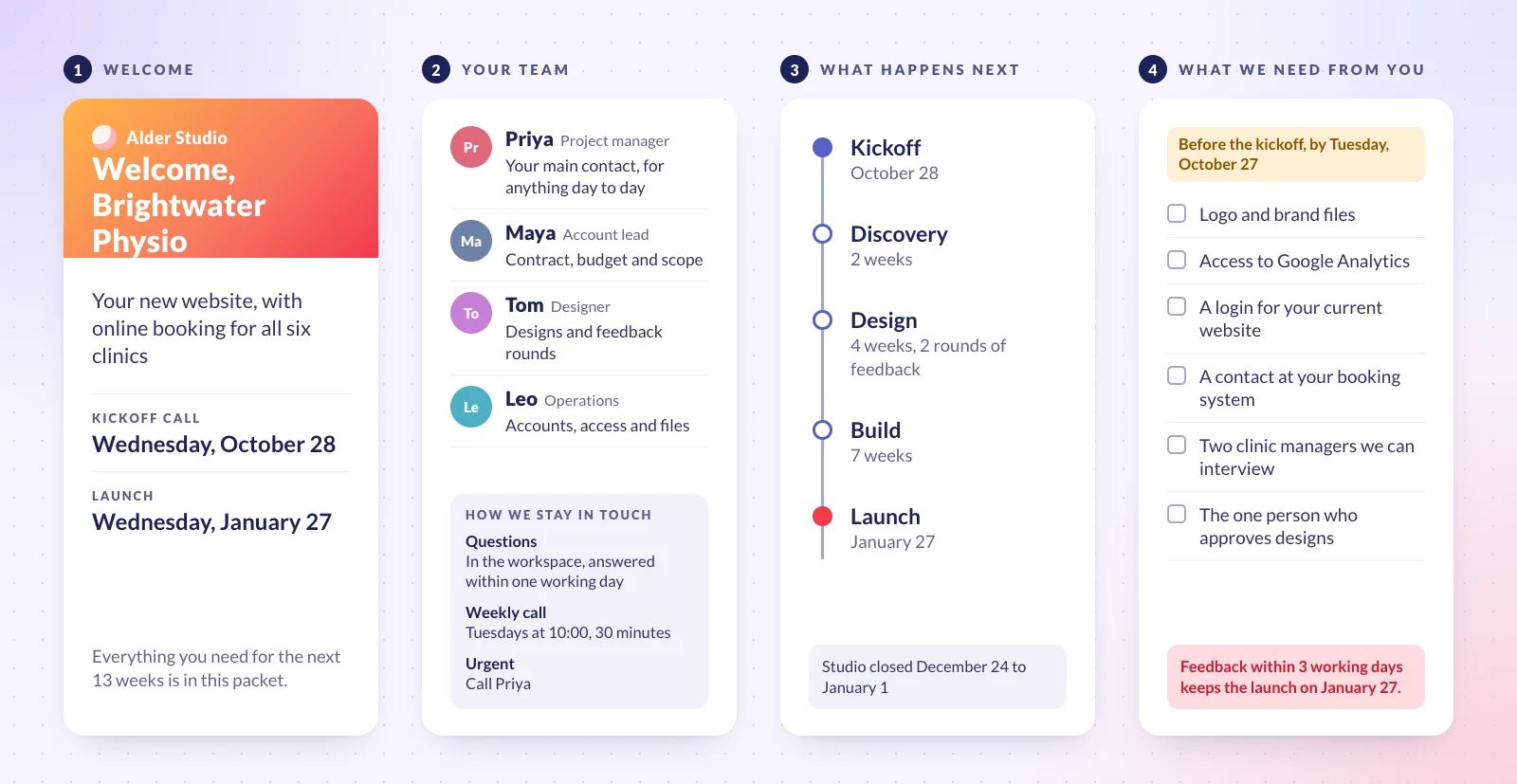
Here is the packet from the image above in full. The agency, the client and the people are made up: Alder Studio, a 25-person design and marketing agency, has just signed Brightwater Physio, a group of six physiotherapy clinics, for a new website with online booking. It's the packet written by the onboarding team in our team charter example, whose goal was a kickoff within five working days of signing.
| Welcome | Thank you for choosing Alder Studio, Sam. Over the next 13 weeks we'll build Brightwater's new website, with online booking for all six clinics, so patients can book a session without calling. This packet explains what happens next and what we need from you. |
|---|---|
| Your team | Priya (project manager): your main contact, for anything day to day. Maya (account lead): the contract, budget and scope. Tom (designer): the designs and the feedback rounds. Leo (operations): accounts, access and files. |
| What happens next | Kickoff call on Wednesday, October 28, 60 minutes. Discovery, 2 weeks: we interview two of your clinic managers and review your analytics and booking data. Design, 4 weeks: the homepage, a clinic page and the booking flow, with two rounds of feedback. Build, 7 weeks. Launch on Wednesday, January 27. |
| How we'll communicate | Questions go in the project's workspace, and we answer within one working day. A 30-minute call every Tuesday at 10:00, and a written update every Friday. Email only for contracts and invoices. We work Monday to Friday, 9:00 to 17:30, and the studio is closed from December 24 to January 1. If something is urgent, call Priya. |
| What we need from you | By Tuesday, October 27: your logo and brand files; access to Google Analytics; a login for your current website; a contact at your booking system; the names of two clinic managers we can interview; and the one person who will approve designs. |
| Feedback and approvals | Each design includes two rounds of feedback. Please send one set of comments, agreed on your side, within three working days. Each day an approval is late moves the launch by about a day; further rounds are quoted separately. |
| Tools and access | You'll get an invitation to the project's workspace in Redbooth, where you'll find your tasks, with this packet attached to the first one, and can comment on any of them. Our video calls start from the same workspace. |
| Policies and FAQ | Invoices: 40% at signing, 30% when the designs are approved, 30% at launch, payable within 30 days. Changes to the scope: ask Maya, and we'll send a written estimate within two working days before doing any work. After launch: 30 days of fixes are included. |
Client Welcome Packet Template
Copy this into a document and answer each question for your business once. That's your master packet. For each new client, change only the parts marked in brackets.
| Section | What to write |
|---|---|
| 1. Welcome | Thank you for choosing us, [client contact]. Over the next [length] we'll [deliverable], so that [the result for their business]. |
| 2. Your team | For each person: name, role, photo, and "ask me about…". Who is the main contact? [Names for this client.] |
| 3. What happens next | Kickoff: [date, time, length]. Then each phase, how long it takes, and what the client sees at the end of it. Delivery: [date]. |
| 4. How we'll communicate | Where do questions go? How fast do you reply? When are the regular meetings and updates? Your hours and holidays. What's urgent, and how do they reach you? |
| 5. What we need from you | [Each file, login, contact and decision], each with a due date: [the day before the kickoff]. |
| 6. Feedback and approvals | How many rounds are included? Who approves on their side? How many days do they have? What happens to the dates when feedback is late, and to the price when more rounds are needed? |
| 7. Tools and access | Where does the project live? How do they log in? Where are files shared? [Link to the workspace and a short guide.] |
| 8. Policies and FAQ | Payment terms. How a change to the scope is requested and priced. What's included after delivery. The questions your last five clients asked. |
When and How to Send It
- Send it within a day of the signature. That's when the client is paying the most attention, and when doubt starts. Waiting until the kickoff wastes the days in between.
- Make it digital. A PDF of four to eight pages works for most clients; a page inside the tool where the project will be managed works even better, because it's where they'll go back to. Print only if your clients expect it.
- Walk through it at the kickoff. Spend the first ten minutes of the call on the packet: the team, the dates, and what's still missing from their list. A packet nobody mentions again is a packet nobody reads.
- Keep a master copy and update it. When a client asks something the packet doesn't answer, add the answer to the master, so the next client never has to ask.
Make It Look Like You
Design matters, because the packet is the client's first piece of work from you. Use your own fonts and colors, one topic per page, real photos of the team, and the client's name on the cover. But keep the effort in proportion: a clear four-page PDF sent today beats a beautiful one that takes a week. Two small extras clients like: a short welcome video from the team, and the meeting dates as a calendar file they can add in one click.
Turn the Packet Into the Client's First Week in Redbooth
A PDF tells the client what to do. If the project is run in Redbooth, the same packet can become the work itself, in a workspace for the client:
- Start the workspace from a template. The Client Intake template sets up a new client's workspace with task lists for the first steps, internal setup, the client's onboarding, and the contents of the welcome package. Workspace templates are on every plan.
- Invite the client. Add your contact as an external user: clients and contractors can view and update tasks in the workspaces you invite them to, up to two per person, and don't take a paid seat. External users are on the Pro plan and above.
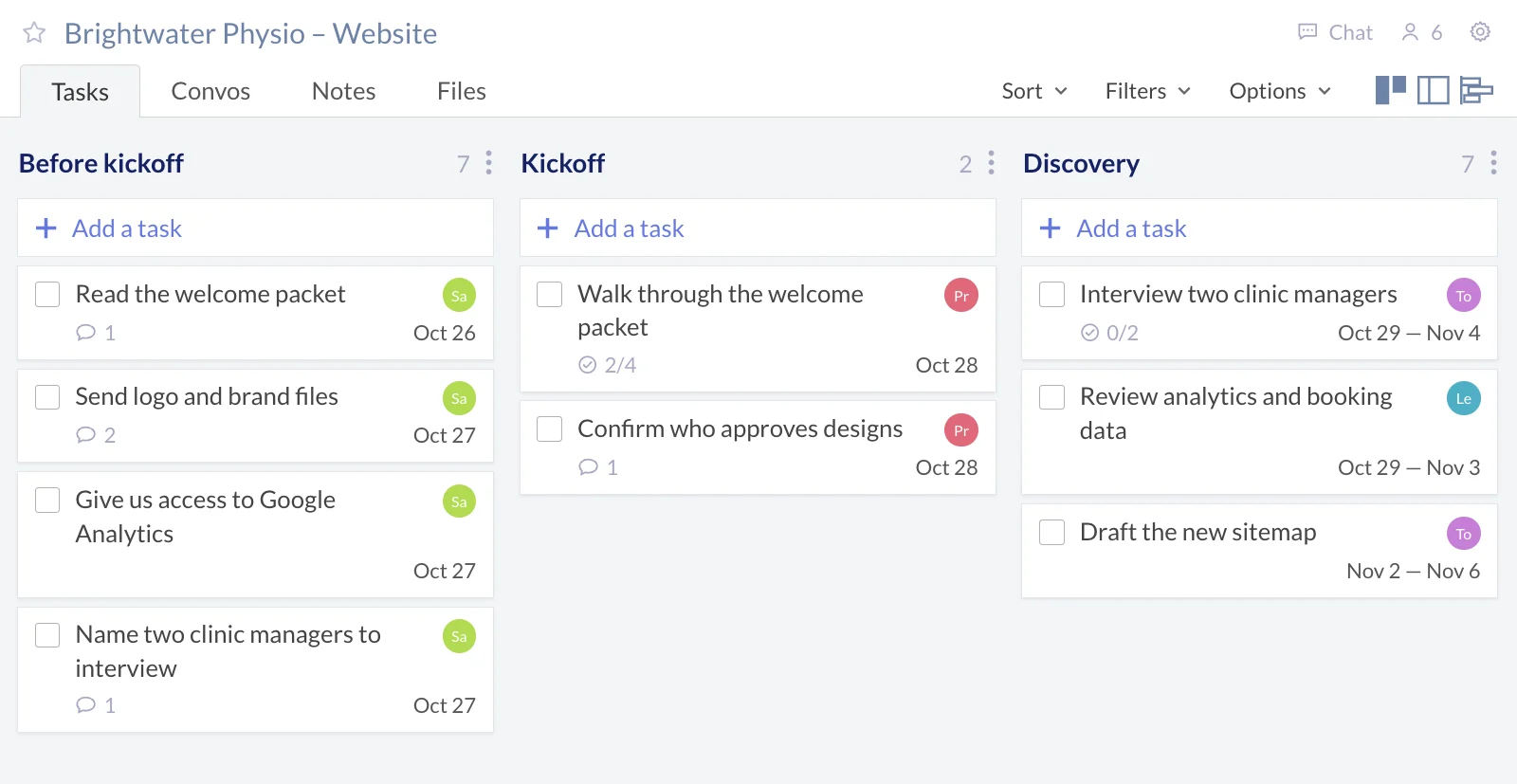
- Put the packet where they'll work. External users work in tasks, so attach the PDF to the client's first task, "Read the welcome packet", rather than leaving it only in the workspace's Files.
- Turn "What we need from you" into tasks. One task per item, assigned to the client, due the day before the kickoff. You can both see what's missing, and the discussion about each item stays on its task.
- Hold the kickoff from the workspace. HD video meetings, powered by Zoom, start from inside a task or a workspace, on the Pro plan and above.
For people on the client's side who don't need an account, two more options: share a single task through a public link, a read-only view that stays up to date (Pro and above), or collect requests and briefs with a web form whose answers arrive as tasks (Business and above). See how agencies run client work in Redbooth.
Mistakes to Avoid
- Turning it into a sales brochure. They've already bought. Spend the pages on what happens next, not on why you're great.
- Vague promises. "We'll get back to you quickly" means something different to everyone. Write "within one working day".
- Burying the client's to-do list. If what you need from them is on page seven, it won't arrive before the kickoff. Give it its own page, with a date.
- Leaving out the hard parts. Feedback rounds, late approvals and scope changes are exactly what the packet is for.
- Writing a new one for every client. Keep one master and change the names and dates; that's what makes it quick enough to send on day one.
Questions People Ask
What should be in a client welcome packet?
A welcome, your team and the main contact, the timeline, how you'll communicate, what you need from the client, how feedback and approvals work, the tools they'll use, and your policies, with answers to common questions.
How long should a welcome packet be?
Four to eight pages, or one page in your project tool. Long enough to answer the questions every new client asks, short enough that they'll read all of it.
When should you send a client welcome packet?
Within a day of the contract being signed, and before the kickoff meeting, so the client can prepare what you need. Then go through it together at the kickoff.
What's the difference between a welcome packet and client onboarding?
Client onboarding is the whole process of bringing a new client on board, from the signed contract to the first weeks of work. The welcome packet is one document in it: the one that tells the client how that process will go.
How do you create a digital welcome packet?
Write it from the template above, design it in your usual tool, and export it as a PDF with working links. Then send it by email, or attach it to the client's first task in the project's workspace, where they'll come back to it.
Start with the client you sign next: copy the template, fill it in for them, and send it the same day.