When we launched Redbooth's MCP server, the launch post listed quick questions to ask an assistant: what's due this week, who has the lightest load, which comments sound blocked. Those are useful. But once an assistant can read and write to your workspaces, it can take on whole jobs that would otherwise eat an afternoon.
This post walks through three of them. We picked them from what we see people connect: alongside Claude and ChatGPT, a good share of the assistants connecting to Redbooth are coding agents such as Claude Code, Codex and Warp, and several are set up for moving work in from spreadsheets and other tools. We ran all three prompts word for word in Claude Code, against test workspaces and a fictional demo agency, and you'll see what came back, including the parts that needed handling.
The MCP server is included in the Pro, Business and Enterprise plans, and works with Claude and any MCP-compatible client.
1. Turn a Spreadsheet Into Tasks
Who it's for: anyone with a plan in Excel, Google Sheets or a CSV file who doesn't want to retype it into Redbooth one task at a time.
The example is an office move, planned in a spreadsheet: one row per task, with a due date and a note.
Create a task for each row of office-move.xlsx in a new task list called "Office move" in the Testing workspace. Use the due date, and put the notes in the description.
What came back: a new "Office move" task list with all eight tasks, each with its due date and its note. We ran it in Claude Code, which reads the file straight from your computer. In a chat app such as Claude, attach the spreadsheet to your message instead.
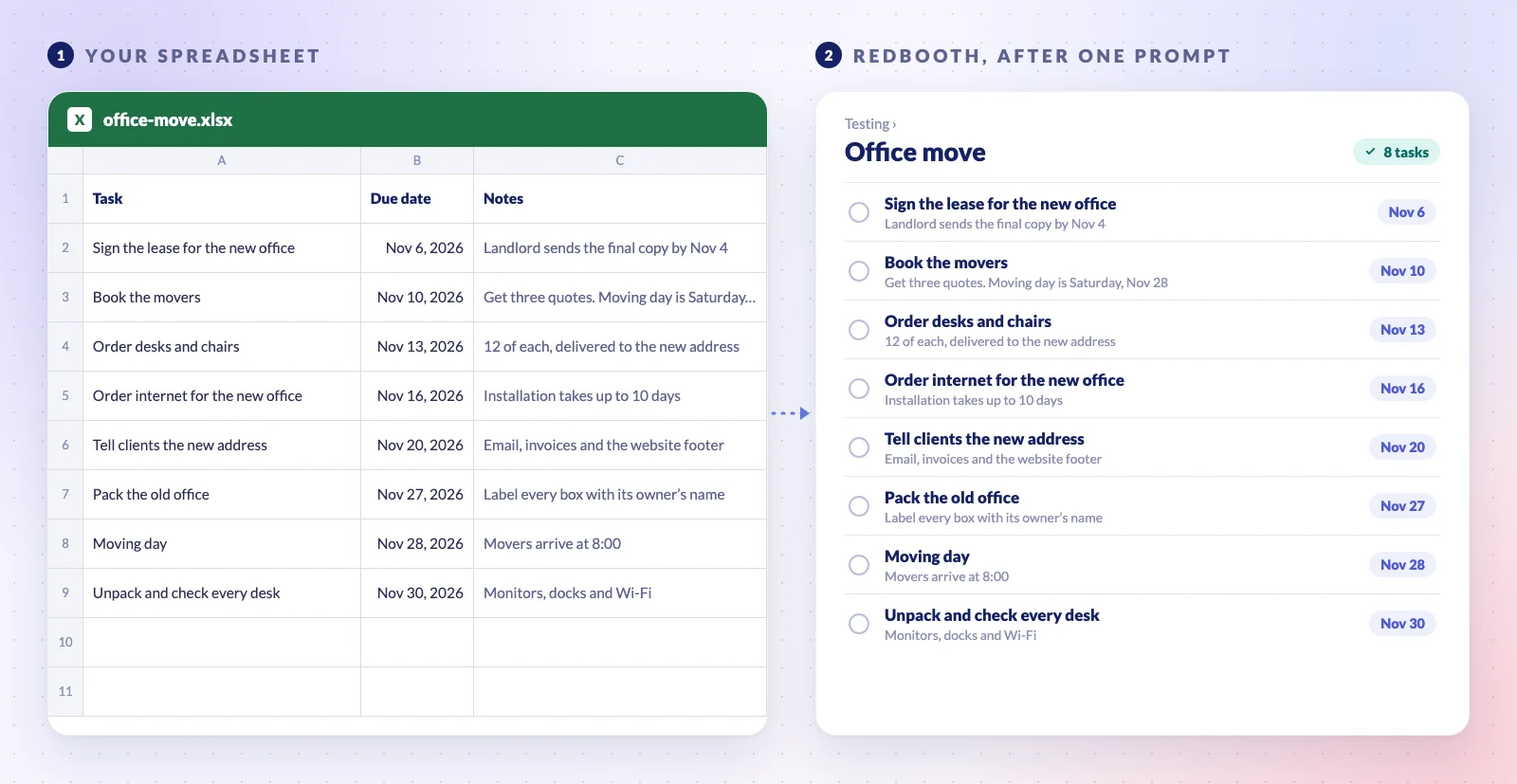
The benefit: the plan goes from the spreadsheet into Redbooth with one prompt, without retyping a single task. Two tips:
- Try a few rows first. With a long sheet, ask it to create the first three and show you before it does the rest.
- Add columns when you need them. An owner column can become assignees, as long as those people are members of the workspace. A "waits for" column can become dependencies, like the ones in our critical path guide.
2. Catch Incomplete Requests Before Work Starts
Who it's for: agencies, design and IT teams whose requests land in an Inbox list, from Web Forms, email or anywhere else.
The problem: requests arrive half-written. Someone has to read each one, decide who takes it and chase the requester for what's missing. When nobody does, the work starts anyway, and the gaps turn up halfway through, when the designer gets stuck.
The flow takes three steps:
- The assistant reads the new requests and checks each one against your brief template. It changes nothing.
- You read its proposal: who should take each request, what's missing, and a message asking for it.
- You say "go ahead", and it assigns the task and posts the message.
Go through the new requests in the Pixel Studios Inbox and check each one against our brief template. Tell me who should take it and what's missing, and draft a message to the requester. Don't change anything yet.
Pixel Studios is a fictional agency we use for demos. Its brief template lists what every request should include: the client, what's being asked, the text, the assets, the deadline and who approves it. This request had just come in:
We're launching our new eco-friendly water bottle line on April 6. Need a 5-slide Instagram carousel introducing the three colorways. Brand guidelines are in the shared drive. Ideally something bright and playful, similar to last year's summer campaign.
What came back:
- Who should take it: Design.
- What's missing: which client it's for, the text for the five slides, product photos of the three colors, the link to the brand guidelines and who approves it.
- A date that doesn't add up: the request says April 6, but it arrived in July, so that date has already passed. It asked instead of guessing.
- A message for the requester, ready to post:
Thanks for the request! Before Design picks it up, could you tell us which client it's for, and confirm the launch date (April 6 of next year)? Please also share the text for the five slides, product photos of the three colors, the link to the brand guidelines and who approves the final version. We'll confirm a delivery date as soon as we have them.
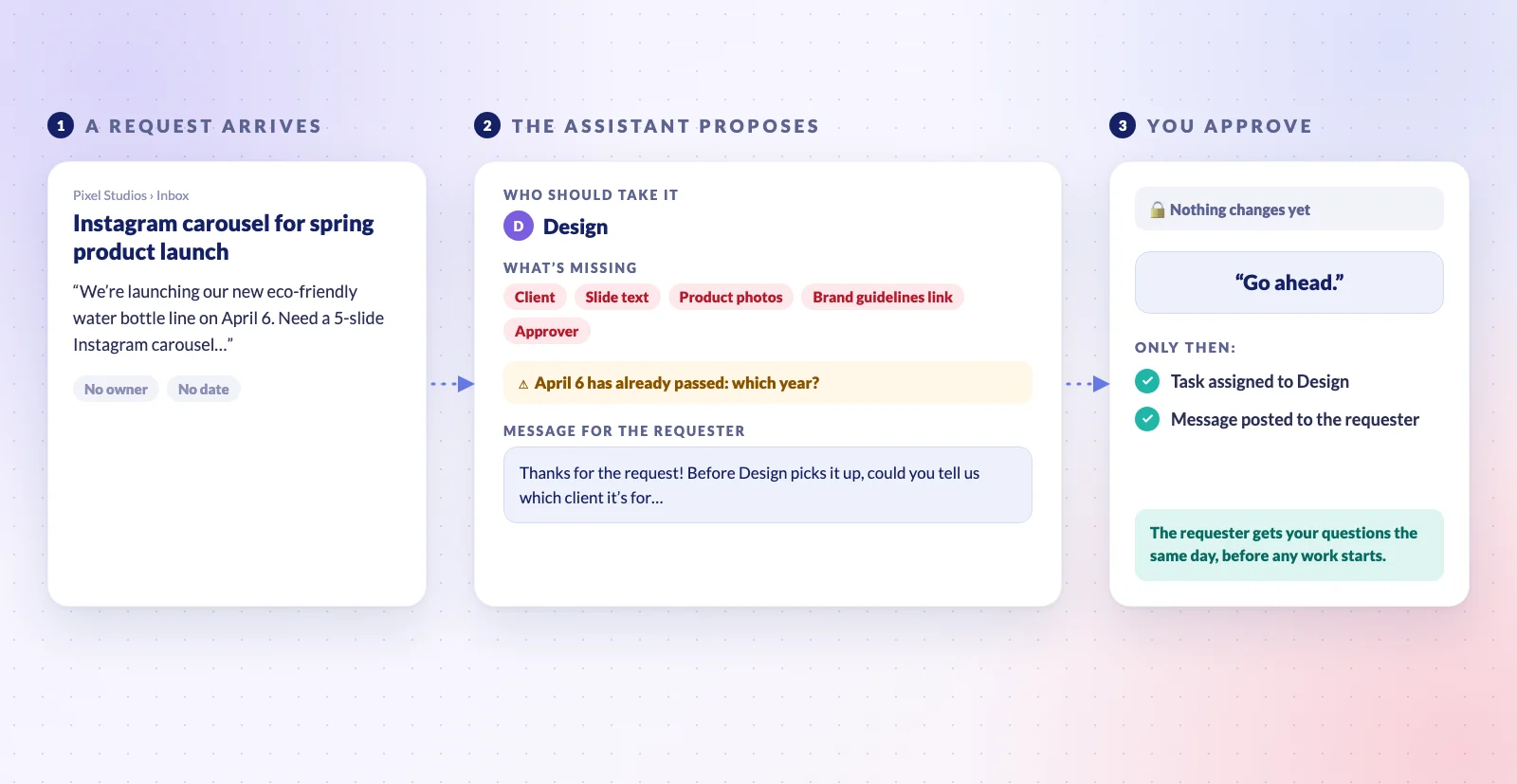
The other two items in the Inbox were a task with no real content and the template itself. It suggested asking what the first was for, or closing it, and leaving the template alone. We stopped before "go ahead" because Pixel Studios is a shared demo.
The benefit: the requester gets your questions the day they ask, not a week later when the designer gets stuck. Nothing sits in the Inbox without an owner, and nothing changes until you've read the plan. Web Forms are part of the Business and Enterprise plans.
3. Hand Website Change Requests to a Coding Agent
Who it's for: web agencies and in-house web teams whose clients keep sending small changes: new opening hours, a broken link, a price update. Each request is a task in Redbooth, and a coding agent such as Claude Code, Codex or Warp makes the change.
Our example is an agency that looks after the website of Grand Cafe, a fictional café. Three requests came in, written the way clients write them: add the holiday opening hours; the "Book a table" button still goes to the old booking page (marked urgent); and "the photo on the homepage looks a bit dated. Can you make it nicer?"
Pick up the open requests in the Grand Cafe website list. Make each change in the grand-cafe-site folder, check it, and comment on the task with what you changed and what you checked. If a request is unclear, ask in the task instead of guessing. Don't close anything.
What came back, one comment per task:
- The booking link, done first because it was urgent. The client wrote that the link was on the homepage "and I think also at the bottom of every page". The agent found it in four places, the homepage button and the footer of all three pages, replaced them all, and checked that no page still links to the old booking page.
- The holiday hours, added under the regular hours on the Contact page. While checking, it noticed something the client hadn't asked about: the footer says "Open every day", which won't be true on December 25 and 26. It asked about that in the comment instead of changing it.
- The photo: it changed nothing. "Nicer" could mean a new picture, a different crop or brighter colors, and the site has no other photo to use, so it asked the client whether they have a new one.
The comment it left on the holiday hours request:
Done, ready for review. Added a "Holiday hours" section to the Contact page, under the regular hours. One thing to check: the footer on every page says "Open every day", which won't be true on December 25 and 26. Do you want to change it? I haven't touched it.
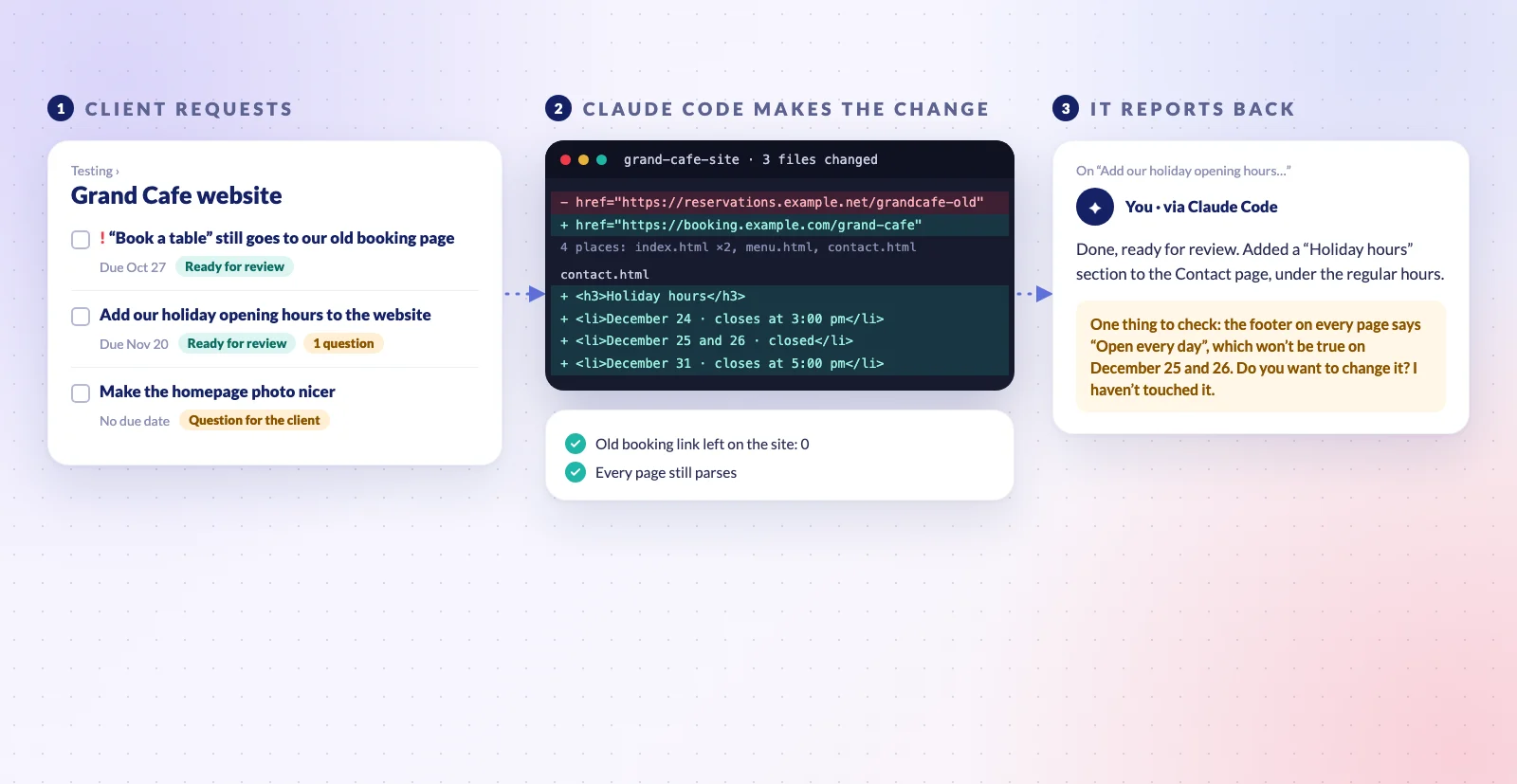
Our demo site was a small folder of HTML pages, so the agent edited the files directly. In a real project it would work on a branch and open a pull request for someone on the team to review.
Why it works: the client asks in their own words, and the request, the change and the answer stay together in one task. The comment says what changed and what was checked, so whoever reviews it knows where to look. A few things that make it work well:
- One request per task, in the client's own words. The agent works from the source, not from someone's summary of it.
- Ask for evidence, not just "done". "What you checked" in the prompt is what turns a status update into something you can trust.
- Tell it to ask when a request is unclear. The photo request shows why: a guess there would have cost a round of revisions.
- Keep the last step human. The agent marks a change ready for review; a person publishes it and closes the task. Its comments appear under your name, so read them before your clients do.
Habits That Make Any of These Work Better
- Name the workspace and the list. It saves a round of "which one did you mean?"
- Ask for a proposal before a big change, as in the second example, and say "go ahead" once you've read it.
- Remember it sees what you see. The assistant works with your Redbooth permissions, so it can only read and change the workspaces you can.
- Give it your team's own standard, a template, a checklist or a naming rule, and it will hold every task to it.
Try One This Week
If you haven't connected an assistant yet, the setup takes about a minute: see Redbooth's MCP server or the steps in our launch post. Then pick the job that eats the most of your week, write the prompt the way you'd brief a colleague, and ask to see the plan before it starts.