In every project, a handful of tasks decide the end date. If one of them slips a day, the deadline slips a day. Everything else can slip a little without anyone outside the team noticing. The critical path method finds those tasks, and PERT adds estimates that admit you don't know exactly how long work will take.
This guide works through both with one small example, from a task list to a timeline: task dependencies, the critical path in five steps, PERT estimates, how it all looks on a Gantt chart, and how to do it in Redbooth.
The Words You Need
- Dependency: a task that can't start (or finish) until another one does.
- Duration: how long a task takes, in working days here.
- Critical path: the longest chain of dependent tasks from start to finish. Its length is the shortest time the project can take.
- Float (or slack): how long a task can be delayed without delaying the project. Tasks on the critical path have zero float.
- Milestone: a point in time that marks something done, with no duration of its own.
The Four Kinds of Dependency
Project schedules link tasks in four ways. The first covers almost every case.
| Type | Rule | Example |
|---|---|---|
| Finish-to-start | B starts after A finishes | Send the invitations after the registration page is live |
| Start-to-start | B starts after A starts | Start editing once writing has started |
| Finish-to-finish | B finishes after A finishes | Testing can't finish before development does |
| Start-to-finish | B finishes after A starts | The old system runs until the new one starts |
Most plans need only finish-to-start, and it's the only kind Redbooth draws (more on that below). If you find yourself reaching for the others, it's often a sign that a task should be split in two.
Find the Critical Path in Five Steps
The example is a team running a customer webinar. Here are the tasks, how long each one takes, and what each one waits for.
| Task | Days | Waits for |
|---|---|---|
| A. Pick the topic and speakers | 3 | – |
| B. Set up the webinar platform | 1 | A |
| C. Write the slides | 5 | A |
| D. Build the registration page | 3 | B |
| E. Send the invitations | 3 | D |
| F. Dry run | 1 | C, E |
| G. Run the webinar | 1 | F |
- List the tasks, their durations and their dependencies, as in the table above. A work breakdown structure (the deliverable split into smaller and smaller pieces) is a good way to make sure nothing is missing.
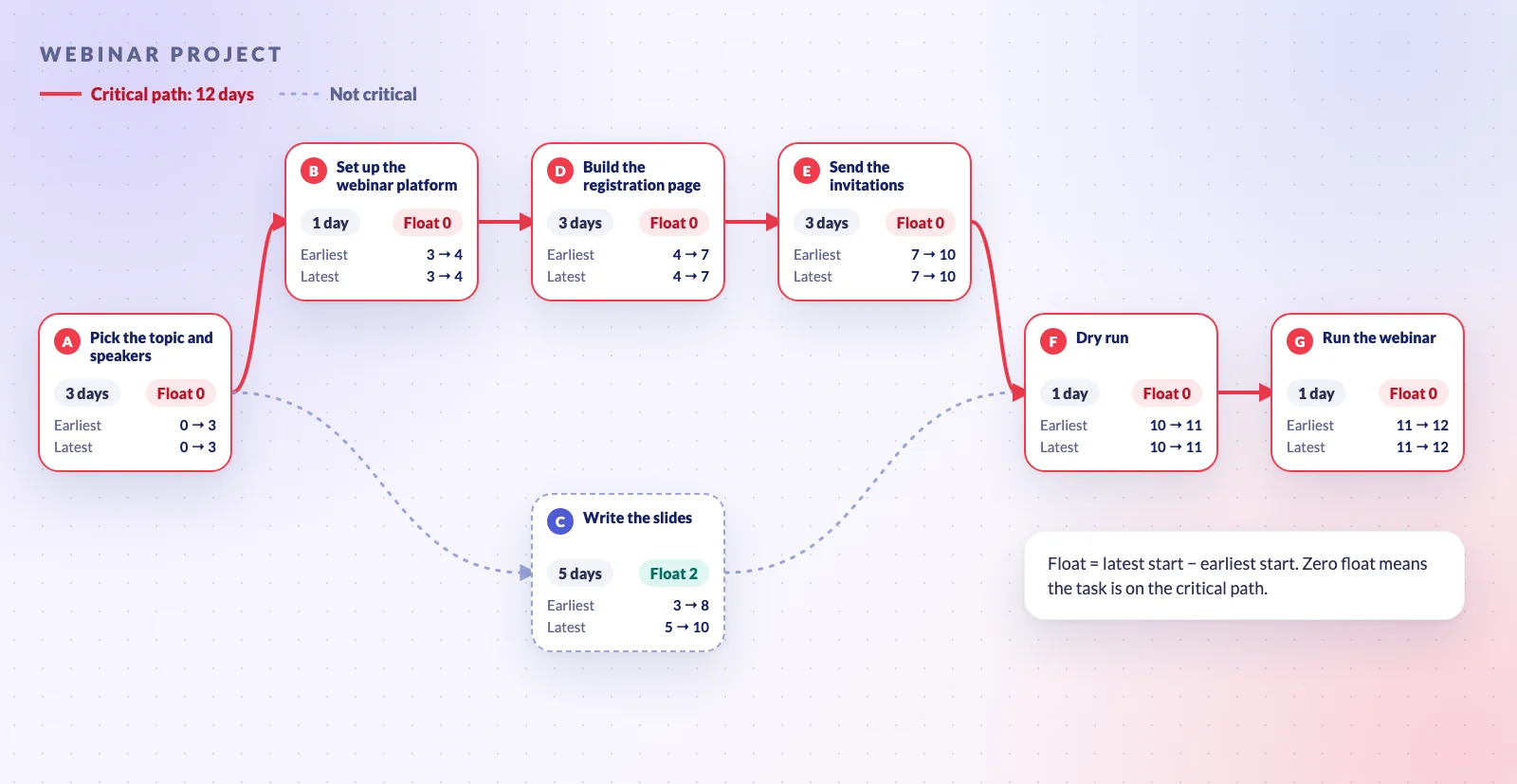
- Draw the network. One box per task, and an arrow from each task to the ones that wait for it, left to right. That's the diagram at the top of this post.
- Go forward: the earliest start and finish. A task can start as soon as everything it waits for is done, so its earliest start is the latest earliest finish among its predecessors, and its earliest finish is that plus its duration. The dry run waits for the slides (done on day 8) and the invitations (done on day 10), so it can't start before day 10. The last task finishes on day 12: that's the project's length.
- Go backward: the latest start and finish. Starting from day 12, each task's latest finish is the earliest latest start among the tasks that wait for it, and its latest start is that minus its duration. The slides must be done by day 10, when the dry run starts at the latest, so they can start as late as day 5.
- Subtract to get the float. Float is the latest start minus the earliest start. The tasks with zero float are the critical path.
| Task | Earliest | Latest | Float | ||
|---|---|---|---|---|---|
| Start | Finish | Start | Finish | ||
| A | 0 | 3 | 0 | 3 | 0 |
| B | 3 | 4 | 3 | 4 | 0 |
| C | 3 | 8 | 5 | 10 | 2 |
| D | 4 | 7 | 4 | 7 | 0 |
| E | 7 | 10 | 7 | 10 | 0 |
| F | 10 | 11 | 10 | 11 | 0 |
| G | 11 | 12 | 11 | 12 | 0 |
The critical path is A → B → D → E → F → G, 12 days. The interesting part is what's not on it. Writing the slides is the biggest creative task in the project, and it's the one everybody worries about, yet it has 2 days of float. The date is set by the registration page and the invitations, which nobody thinks of as hard. That's the point of the exercise: it shows where to watch, which is rarely where the effort is.
Two things to keep in mind. A project can have more than one critical path, when two chains are equally long. And float gets used up: if the slides slip 3 days, they become critical and the dry run moves with them.
PERT: Estimates for When You're Not Sure
The critical path method assumes you know each duration. PERT (the Program Evaluation and Review Technique) doesn't. It was developed for the U.S. Navy's Polaris missile program and made public in 1958, at about the same time as the critical path method, which Morgan R. Walker of DuPont and James E. Kelley Jr. of Remington Rand developed in the late 1950s.
For each task, PERT asks for three estimates and combines them:
- Expected time = (optimistic + 4 × most likely + pessimistic) ÷ 6
- Standard deviation (σ) = (pessimistic − optimistic) ÷ 6
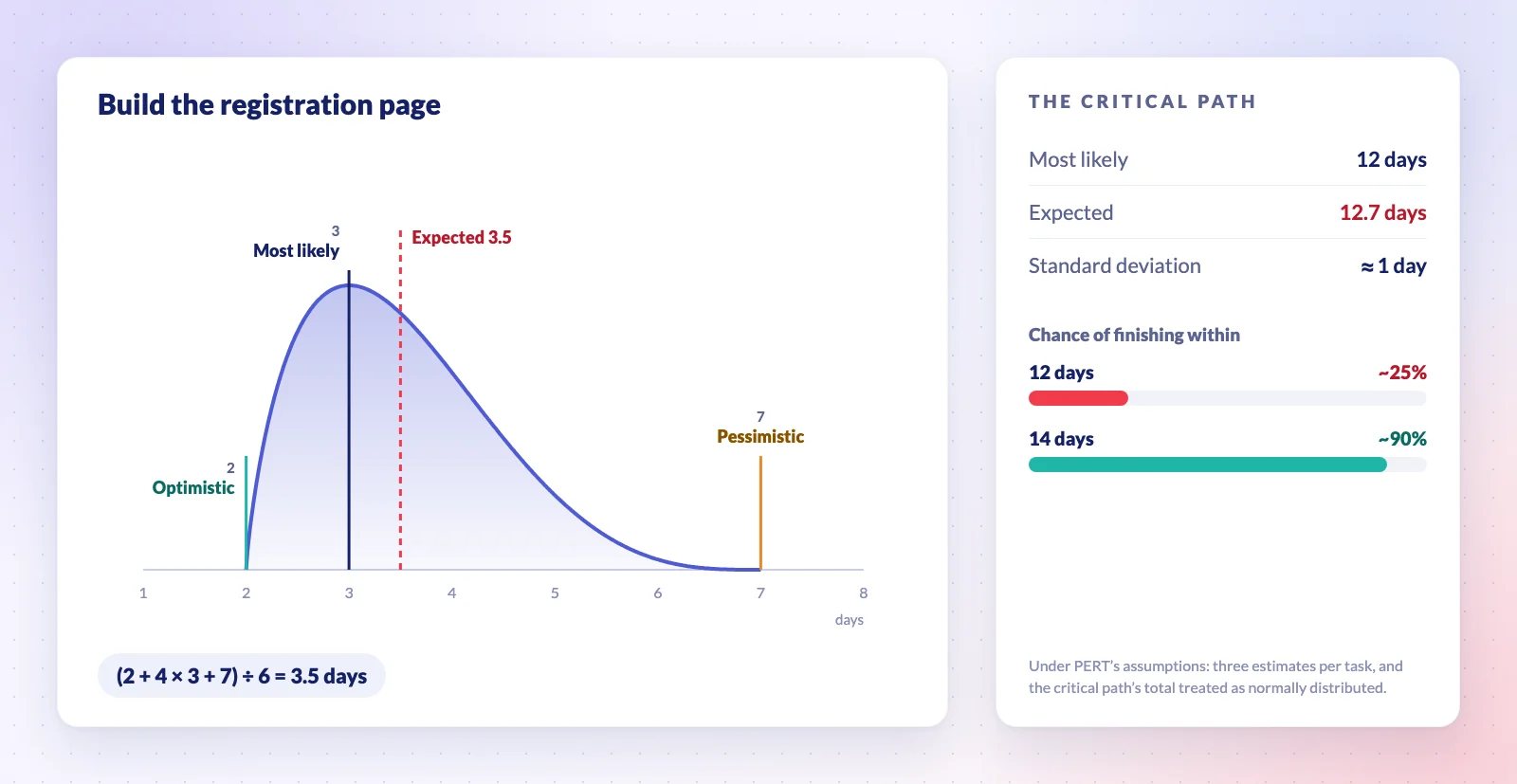
Take the registration page. It most likely takes 3 days, could take 2, and could take 7 if the form has to talk to the CRM. Its expected time is (2 + 4 × 3 + 7) ÷ 6 = 3.5 days, not 3: one bad case pulls the estimate up.
| Task | Optimistic | Most likely | Pessimistic | Expected | σ |
|---|---|---|---|---|---|
| A | 2 | 3 | 4 | 3.0 | 0.33 |
| B | 1 | 1 | 2 | 1.17 | 0.17 |
| C | 3 | 5 | 8 | 5.17 | 0.83 |
| D | 2 | 3 | 7 | 3.5 | 0.83 |
| E | 2 | 3 | 4 | 3.0 | 0.33 |
| F | 1 | 1 | 1 | 1.0 | 0 |
| G | 1 | 1 | 1 | 1.0 | 0 |
Add up the expected times along the critical path and you get 12.7 days, against the 12 the most-likely estimates promised. The path's standard deviation is the square root of the sum of its tasks' variances: about 1 day. PERT treats the total as roughly normally distributed, and under that assumption a 12-day plan has only about a one-in-four chance of holding, while promising 14 days gives you about a 90% chance. (Writing the slides stays off the critical path: its chain is expected to take 10.2 days.)
That's the practical value of PERT. You don't need to run it on every task, only on the critical path and the chains close to it, to see how much buffer a date needs before you commit to it.
From Network Diagram to Gantt Chart
A PERT chart, or network diagram, is good for working out the logic. A Gantt chart is better for running the project, because it puts the same tasks on a calendar.
| Network diagram (PERT chart) | Gantt chart | |
|---|---|---|
| Shows | Which task waits for which | When each task happens |
| Looks like | Boxes and arrows | Bars on a timeline |
| Best for | Planning the order and finding the critical path | Tracking progress week by week |
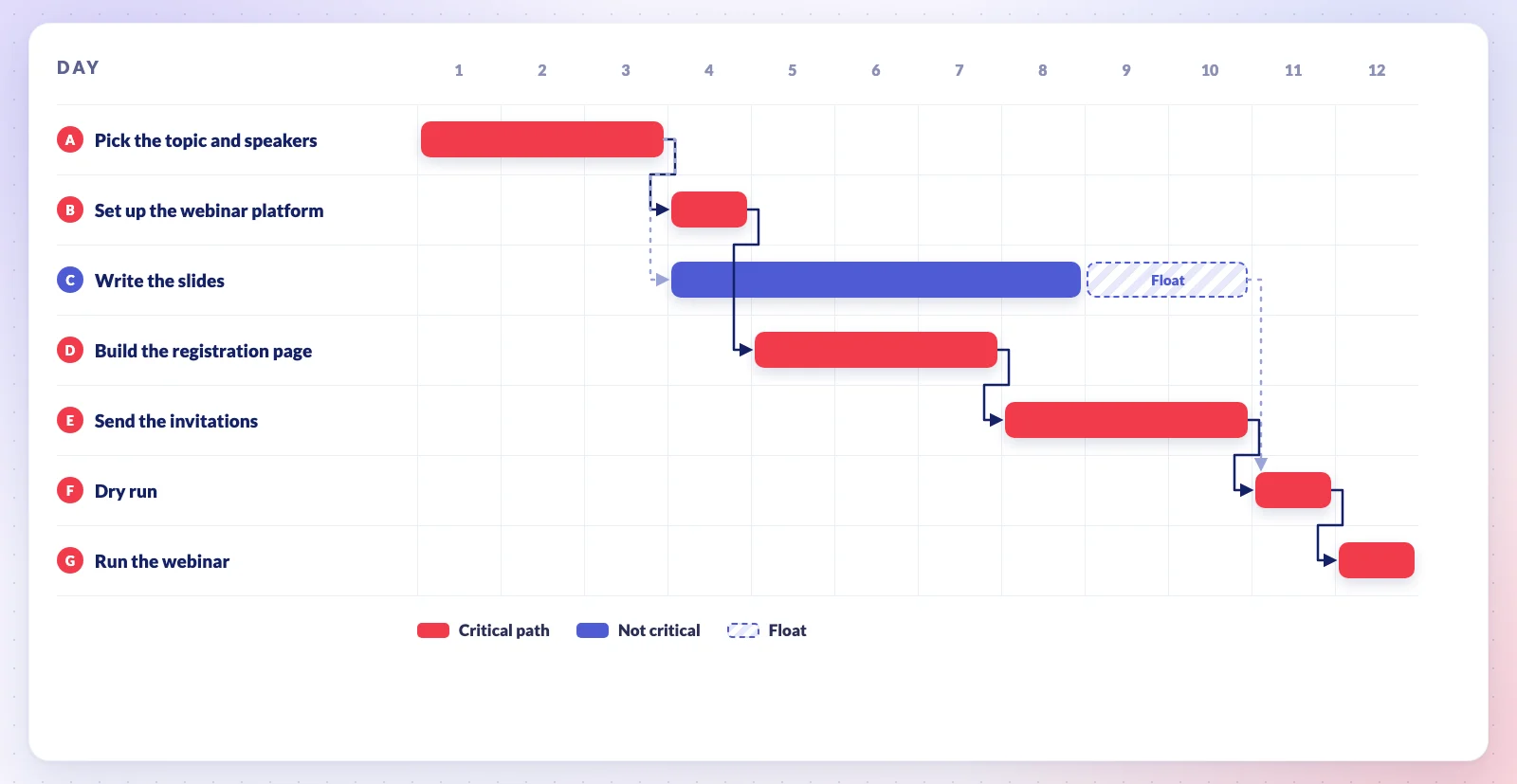
With the dependencies drawn on it, a Gantt chart shows both: the bars on the critical path run end to end, and the 2 days of float on the slides appear as a gap before the dry run.
Doing It in Redbooth
Redbooth's Gantt chart is the Timeline view of a workspace, on every plan including Free. Task dependencies on the timeline are part of the Pro, Business and Enterprise plans.
- To link two tasks, hover over a task's bar in Timeline view and drag the orange dot on its right onto the task that waits for it. You can also open a task, click Add dependencies, and choose whether it is Blocking or Blocked by another task.
- Dependencies are finish-to-start, between tasks in the same workspace, and the task that waits has to start on or after the day the first one is due.
- When a task slips, move its due date later on the timeline and Redbooth offers to move every task that depends on it. On the critical path, that's how you see the new end date straight away.
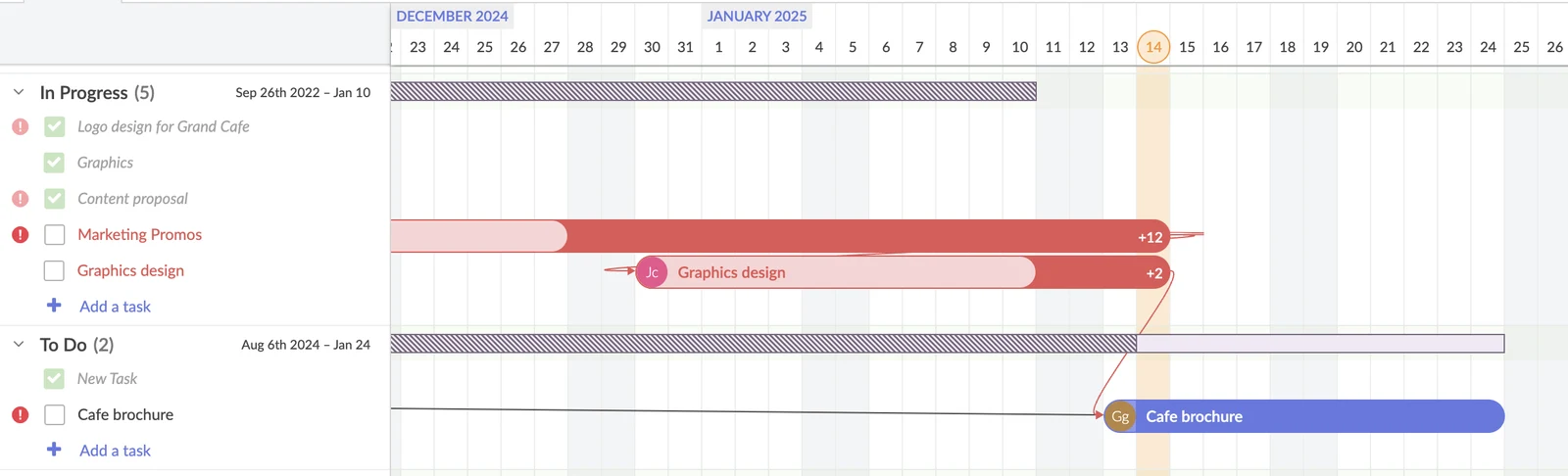
Redbooth doesn't calculate the critical path or the float for you. In practice that matters less than it sounds: work it out once at the start, using the five steps above, and give the critical tasks a tag such as critical path, so everyone can see which tasks set the date. When one of them moves, the timeline shows what moves with it. The screenshot is from Grand Cafe, a fictional demo workspace.
The step-by-step guides are in our Help Center: Task Dependencies in Timeline View and Task Dependencies in Task Card.
Questions People Ask
What's the difference between PERT and the critical path method?
Both draw the project as a network of dependent tasks and find the longest chain. The critical path method uses one duration per task, which suits work you've done many times. PERT uses three estimates per task, which suits work you haven't. In practice the names are often used for the same diagram.
Is a Gantt chart the same as a critical path?
No. A Gantt chart is a way to draw a schedule; the critical path is a property of the schedule. A Gantt chart with dependencies drawn on it can show the critical path, but the chart doesn't find it by itself.
What happens when a task that isn't critical slips?
Nothing, until it has used up its float. After that it joins the critical path and delays the project day for day. That's why it's worth knowing how much float each task has, not just which tasks have none.
What is critical chain?
A later method, introduced by Eliyahu M. Goldratt in his 1997 book Critical Chain. Instead of padding each task, it takes the padding out and pools it into a buffer at the end of the project, plus smaller buffers where other chains feed into the critical one. How fast the buffer is being used up tells you whether the project is in trouble.
How often should you recalculate the critical path?
Whenever a dependency changes or a task on or near the critical path slips by more than its float. For most projects that means a quick check at each weekly review.
Try it on the project you're planning now: list the tasks, draw the arrows, and find the chain that sets the date. Then put it on a timeline where the whole team can see it.